Top 5 FAQ
-
If the coffee button on your Vertuo Next blinks red or orange, please follow these steps:
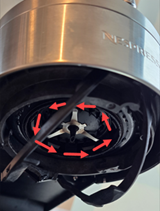
- Check Rotor: Ensure it spins freely and is clean.
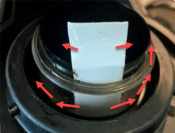
- Clean Barcode Reader: Use a piece of paper, inserting it 5 cm down to clean.
- Inspect Water Tank and Capsule: Ensure the tank is full and the capsule container is empty.
- Check Capsule: Ensure the capsule is fresh, undamaged, and the barcode is readable.
- Ensure Machine is Locked: Confirm that the machine is fully in the locked position.
Now, attempt to brew.
If the issue persists:
- Run Cleaning Cycle: Fill the tank, turn on the machine, lock the head, place a 1L container under the outlet, and press the coffee button three times quickly. Wait for the steady light to confirm completion.
- Power Cycle: Unplug for 30 seconds, then plug back in.
- Factory Reset: Open machine head, empty capsules, close head (unlocked), and press coffee button 5 times within 3 seconds. Button will blink orange 5 times to confirm.
For further troubleshooting of your Vertuo Next – visit this page!
Did this answer your question? If not, contact us, we will be pleased to help you. You may also call us on 80 909 600 Mon-Fri 08:00-18:00 and Saturday 09:00-18:00, Sunday/bank holiday-closed.
Rate this answer - Check Rotor: Ensure it spins freely and is clean.
-
In Denmark, we recommend that the machine be descaled regularly using a double dosage of descaling liquid (after every 200 capsules), as instructed in your machine manual or when the machine indicates that it is time for descaling.
Please note that descaling may need to be performed more frequently than the alarm indicates due to the high levels of lime scale in Denmark. The machine will display the following symptoms when it is time to descale:- Poor flow
- Cold coffee / bad taste
- Squeaking sound
We highly recommend that you ensure you have set the correct water hardness on your machine. Additionally, please keep in mind that machines with any type of steampipe will require descaling more often (after 30-40 minutes of using the steamer).
To enhance the quality of your water and naturally reduce lime scale buildup, we recommend using a filter solution, as for example a Brita filter in conjunction with our descaling liquid. The Brita filter effectively reduces lime scale and provides fresh-tasting water, complementing the descaling process.
The descaling process prevents lime scale buildup in the machine, which can affect, taste, temperature and decrease water flow.- Use the Nespresso descaling kit with lactic acid for safe and effective cleaning without harm.
- Important: Descalers containing citric acid and vinegar may harm the machine and void the warranty.
Did this answer your question? If not, contact us, we will be pleased to help you. You may also call us on 80 909 600 Mon-Fri 08:00-18:00 and Saturday 09:00-18:00, Sunday/bank holiday-closed.
Rate this answer -
When you choose delivery to a nearby pickup point or collection from a Nespresso Boutique, your parcel will be held for 7 days before being returned to us.
If you choose delivery to a PostNord Parcel Locker, your parcel will be held for 3 days.
We recommend collecting your parcel as soon as you receive the notification that it is ready for pickup.
Did this answer your question? If not, contact us, we will be pleased to help you. You may also call us on 80 909 600 Mon-Fri 08:00-18:00 and Saturday 09:00-18:00, Sunday/bank holiday-closed.
Rate this answer -
All our Vertuo coffee machines are equipped with a descaling alert. Although the alert is described as half red and half green in your machine's user manual, the green light can appear to be yellow under certain conditions.
We recommend descaling your machine every 3 months or after 300 capsules, whichever comes first. Over time, water used during brewing may cause internal mineral build up, which can affect the flow, temperature and overall performance of your machine.
You may purchase a descaling kit online, by phone, or in any Nespresso Boutique. One kit contains enough descaling solution for two descalings.
For further troubleshooting of your Vertuo Next – visit this page!
Did this answer your question? If not, contact us, we will be pleased to help you. You may also call us on 80 909 600 Mon-Fri 08:00-18:00 and Saturday 09:00-18:00, Sunday/bank holiday-closed.
Rate this answer -
- Use the latest Nespresso Smart app.
- Ensure Bluetooth + Wi‑Fi are enabled on your phone/tablet and permissions are granted.
- Activate Bluetooth + Wi‑Fi on the machine and make sure it’s not paired to another device.
- Keep your device very close to the machine during pairing.
- Avoid pairing near a running microwave (signal interference).
- Do not pair while your phone/tablet is connected to other Bluetooth devices.
- For Wi‑Fi: connect to a 2.4 GHz network (not 5 GHz) using WPA/WPA2 security.
- Wi‑Fi names must be 32 characters or fewer and cannot include special characters (%, ", `, etc.).
- If pairing still fails, do a factory reset and power cycle the machine (unplug 1 min and retry).
- Move the machine closer to the router during setup.
Additional Notes
- Close all apps except the Nespresso Smart app.
- Avoid pairing near USB devices connected to powered computers (can interfere with Bluetooth).
- Duplicate machine registration in the customer’s account can cause issues—support can remove duplicates.
- Machines produced before S/N 21130XXX may not work with Android 12+.
Did this answer your question? If not, contact us, we will be pleased to help you. You may also call us on 80 909 600 Mon-Fri 08:00-18:00 and Saturday 09:00-18:00, Sunday/bank holiday-closed.
Rate this answer