Top 5 FAQ
-
We are sorry to hear that, we'll fix it as soon as we can!
If the package has a visible damage to the outer packaging, this must be claimed with the postal office immediately upon pickup or contact Nespresso within 24 hours after you have picked up your order.
If the package has a hidden damage or if any product inside is damaged, you must contact Nespresso within 7 days of your order being removed.
Save the damaged capsules / goods and all original packaging until the claim is completed.
How to handle a claim step by step:
To make it as easy and fast as possible for you, include the following information when sending your complaint:
1.We need photos of:
- The shipping label on the shipment. The entire address must be visible and legible.
- The shipment in its entirety: all sides of the outer packaging, as well as photos of any damaged packaging.
- The damaged product/s (if coffee, always add pictures of the damaged capsules, not just the sleeves)
These are all necessary so that we can better understand and see what has happened, please attach all photos in your email to us.2. If the content is damaged, we need to know how much and what products are defect - to claim the right products and quickly send out a replacement order to you.
3. We will contact the supplier and continue the case. At the same time, we will ensure that you receive the goods you ordered as quickly as possible, in perfect condition.
Did this answer your question? If not, contact us, we are pleased to help you. You may also call us on 0200 456 600 Mon-Fri 08:00-18:00 and Saturday 09:00-18:00, Sunday/bank holidays -closed .
Rate this answer -
If the coffee button on your Vertuo Next blinks red or orange, please follow these steps:
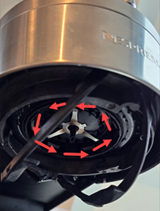
- Check Rotor: Ensure it spins freely and is clean.
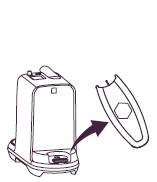
- Clean Barcode Reader: Use a piece of paper, inserting it 5 cm down to clean.
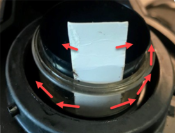
- Inspect Water Tank and Capsule: Ensure the tank is full and the capsule container is empty.
- Check Capsule: Ensure the capsule is fresh, undamaged, and the barcode is readable.
- Ensure Machine is Locked: Confirm that the machine is fully in the locked position.
Now, attempt to brew.
If the issue persists:
- Run Cleaning Cycle: Fill the tank, turn on the machine, lock the head, place a 1L container under the outlet, and press the coffee button three times quickly. Wait for the steady light to confirm completion.
- Power Cycle: Unplug for 30 seconds, then plug back in.
- Factory Reset: Open machine head, empty capsules, close head (unlocked), and press coffee button 5 times within 3 seconds. Button will blink orange 5 times to confirm.
For further troubleshooting of your Vertuo Next – visit this page!
Did this answer your question? If not, contact us, we are pleased to help you. You may also call us on 0200 456 600 Mon-Fri 08:00-18:00 and Saturday 09:00-18:00, Sunday/bank holidays -closed .
Rate this answer - Check Rotor: Ensure it spins freely and is clean.
-
- Use the latest Nespresso Smart app.
- Ensure Bluetooth + Wi‑Fi are enabled on your phone/tablet and permissions are granted.
- Activate Bluetooth + Wi‑Fi on the machine and make sure it’s not paired to another device.
- Keep your device very close to the machine during pairing.
- Avoid pairing near a running microwave (signal interference).
- Do not pair while your phone/tablet is connected to other Bluetooth devices.
- For Wi‑Fi: connect to a 2.4 GHz network (not 5 GHz) using WPA/WPA2 security.
- Wi‑Fi names must be 32 characters or fewer and cannot include special characters (%, ", `, etc.).
- If pairing still fails, do a factory reset and power cycle the machine (unplug 1 min and retry).
- Move the machine closer to the router during setup.
Additional Notes
- Close all apps except the Nespresso Smart app.
- Avoid pairing near USB devices connected to powered computers (can interfere with Bluetooth).
- Duplicate machine registration in the customer’s account can cause issues—support can remove duplicates.
- Machines produced before S/N 21130XXX may not work with Android 12+.
Did this answer your question? If not, contact us, we are pleased to help you. You may also call us on 0200 456 600 Mon-Fri 08:00-18:00 and Saturday 09:00-18:00, Sunday/bank holidays -closed .
Rate this answer -
Before seeking repairs, we recommend that you first try some concrete solutions. Many issues can often be resolved by performing a factory reset, following a cleaning program, or conducting descaling.
We direct you to our Machine Assistance Page, where you can find instructional videos and FAQs specific to your problem. You can easily access these resources by clicking here.
If you cannot find a solution or need assistance ordering spare parts, please contact our support team at 0200 456 600, available on weekdays from 08:00 to 18:00 and Saturdays from 09:00 to 18:00; we are closed on Sundays and bank holidays.
If your coffee machine is still under warranty and further assistance is needed, you may be referred to one of our three Boutiques for additional troubleshooting:Please ensure that your machine is clean and has the original plug, as the Boutique will not accept it for troubleshooting otherwise. When you leave your machine at a Boutique, you will receive a receipt with an estimated repair time. While we strive to provide a loaner machine, please note that availability is limited.
To ensure a smooth process, please register your machine on your member account and verify that you have a valid warranty. Our skilled technicians will inspect and test your machine, and if more extensive repairs are necessary, it will be sent to our repair center. You will be notified via SMS or email when your machine is ready for pickup.
Thank you for considering troubleshooting first; it can significantly help in resolving issues efficiently!Did this answer your question? If not, contact us, we are pleased to help you. You may also call us on 0200 456 600 Mon-Fri 08:00-18:00 and Saturday 09:00-18:00, Sunday/bank holidays -closed .
Rate this answer -
If you need a spare part to your Nespresso machine we recommend you to contact us on 0200 456 600 and we will help you. We are available on weekdays 08:00-18:00 and Saturdays 09:00-18:00, Sundays and bank holidays - closed.
Did this answer your question? If not, contact us, we are pleased to help you. You may also call us on 0200 456 600 Mon-Fri 08:00-18:00 and Saturday 09:00-18:00, Sunday/bank holidays -closed .
Rate this answer